Others#

Features that do not fit in to other menus.

QRCodes#
Display QR codes for the Bruce AP, or any given string.
These can be added to bruce.conf.
Megladon#
Become Bruce and eat all the fish in the ocean!
Mic Spectrum#
Shows the audio spectrum being picked up by the microphone in the device.
Mic Record#
Records audio from the devices microphone and saves as a .wav file.
BadUSB#
DuckyScript payloads are supported.
For more info on creating your own DuckyScripts read here.
Running BadUSB Scripts#
- Create a payload and upload it to your device, you can use the WebUI.
- Once uploaded choose the BadUSB menu item and browse to the file on your device.
- When connected to a device the playback of the script will start
Other Methods#
- Via the SDCard/LittleFS file manager in the "Others" menu (select a
.txtfile) - Remotely via the WebUI click on the icon to start playback
- Via a serial cmd e.g.
badusb run_from_file HelloWorld.txt
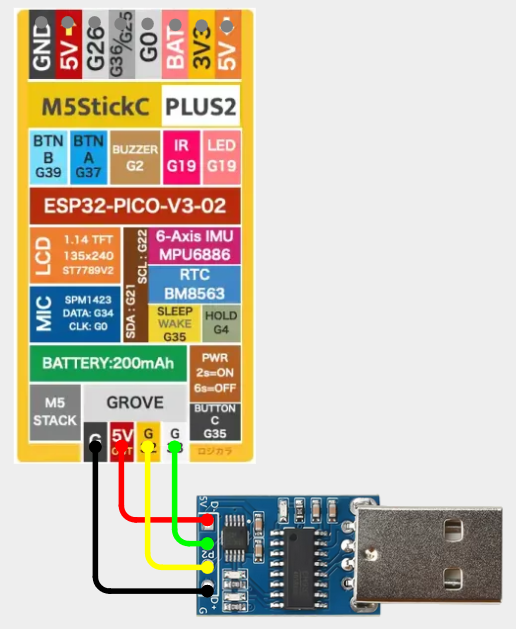
Using BadUSB on StickCs and Core/Core2 Devices#
See more information here M5StickC - CH9329
USB Keyboard#
Use your Bruce device as a USB keyboard when connected to another device.
Clicker#
USB Mouse clicker that you can control the delay between the clicks, this is usually used to cheat in some clicker games.
iButton#
Read, write and copy information from an iButton.
Wiring#

Timer#
Simple timer that you can set the hours, minutes and seconds until the countdown sound is played and the timer closes.